AWS vs Azure vs GCP: A Strategic Comparison
The AWS vs. Azure vs. GCP debate boils down to this: AWS offers the most extensive toolbox, Azure is the default for hybrid enterprise, and GCP leads in data, AI, and containerized applications. The right choice is not about which is “best,” but which aligns with your specific business priorities.
Understanding the Cloud Platform Showdown
Your choice of cloud provider is a foundational decision that impacts budget, performance, security, and innovation. The objective is to select the platform that fits your team’s skills, existing tech stack, and strategic goals.
In the 2025 cloud market, the hierarchy is established. AWS holds the top spot with 29-33% of the global market. Microsoft Azure is a strong second, with 20-26%, and Google Cloud Platform (GCP) has solidified its position at 10-13%. This market share directly influences the size of the community, availability of third-party tools, and the depth of the available talent pool.
Executive Summary: Cloud Platform At-a-Glance
Each provider has a distinct focus. AWS is the established giant with a service for nearly every use case, making it the choice for organizations that require maximum flexibility. Azure leverages its strengths by offering deep integration for businesses already invested in Microsoft software. GCP, built on Google’s internal infrastructure, is a powerhouse for data analytics, machine learning, and Kubernetes.
This table provides a snapshot of where each provider stands. For a more detailed breakdown, you can choose the right cloud provider with our comprehensive guide.
| Attribute | AWS (Amazon Web Services) | Microsoft Azure | Google Cloud Platform (GCP) |
|---|---|---|---|
| Primary Strength | Unmatched breadth and depth of services; largest market share and community. | Seamless integration with Microsoft enterprise ecosystem; strong hybrid cloud capabilities. | Excellence in data analytics, AI/ML, and container orchestration (Kubernetes). |
| Ideal Use Case | Organizations needing a vast, mature portfolio for diverse, complex workloads. | Enterprises with significant investments in Windows Server, Office 365, and Azure AD. | Companies focused on cloud-native apps, data science, and leveraging cutting-edge AI. |
| Market Position | Established leader with proven reliability and an extensive global footprint. | Strong challenger, rapidly growing in the enterprise and regulated industries. | A key innovator and thought leader in data, open-source, and containerization. |
This high-level view sets the stage, but the real decision lies in the details—how each platform handles the specific workloads, compliance needs, and cost models that matter to your business. If you already have a shortlist, you can compare firms head-to-head to see how their certified partnerships and capabilities stack up.
Comparing Core Compute, Storage, and Networking
A cloud provider’s value is rooted in its fundamental infrastructure—compute, storage, and networking. While AWS, Azure, and GCP all offer a solid foundation, architectural differences, performance characteristics, and pricing models can significantly impact your budget and application responsiveness. This is where the core “AWS vs Azure vs GCP” comparison begins.
These core services are not commodities. AWS provides a massive menu of options for nearly any scenario. Azure is designed to be a natural extension of an on-premise datacenter. GCP is engineered for large-scale, data-intensive workloads that demand speed. The optimal fit depends on your application’s specific requirements.
Compute Instance Variety and Performance
Virtual machines are the workhorses of the cloud, but instance variety, specialized hardware availability, and the reliability of discount models are key differentiators.
AWS EC2 offers the most extensive and granular list of instance types. This is a significant advantage for complex applications with specific resource needs, as it allows you to precisely dial in the required performance profile.
Azure Virtual Machines are a strong competitor, particularly for Windows workloads. The Azure Hybrid Benefit, which allows the use of existing on-premises licenses, can dramatically reduce cloud costs. While its instance catalog is large, it can be less specialized than AWS’s offerings.
GCP Compute Engine differentiates itself with user-friendly features like custom machine types and per-second billing, which simplifies cost management. Its live migration capability, which moves VMs during host maintenance without downtime, is a standout feature for maintaining application availability.
Key Differentiator: AWS’s strength is its unmatched selection for fine-tuning performance. GCP focuses on operational simplicity and resilience with features like live migration. Azure’s sweet spot is cost-efficiency for existing Microsoft enterprise customers.
For cost reduction, spot instances (or preemptible VMs) are essential.
- AWS Spot Instances are dynamic, with prices that fluctuate based on real-time supply and demand. Savings can reach 90%, but this requires robust automation to handle frequent interruptions, as prices can change nearly 200 times per month.
- Azure Spot Virtual Machines offer similarly deep discounts but with more predictable pricing than AWS, making them a slightly more stable choice for fault-tolerant workloads.
- GCP Preemptible VMs provide a fixed discount (up to 80%) and a 24-hour maximum runtime. This is a more predictable cost-saving model but offers less flexibility than AWS Spot Instances.
Storage Tiers and Latency Considerations
Cloud storage is a tiered system balancing cost, speed, and accessibility. The key differences lie in object storage lifecycle rules and the latency of high-performance block storage.
All three providers have mature object storage services: AWS S3, Azure Blob Storage, and Google Cloud Storage. The critical comparison point is the cost and complexity of managing data movement between tiers and retrieving data from deep archives.
| Storage Attribute | AWS (S3) | Azure (Blob Storage) | GCP (Cloud Storage) |
|---|---|---|---|
| Archival Retrieval | Glacier Deep Archive offers the lowest storage cost, but retrieval can take up to 12 hours. | The Archive Tier is cost-effective, with retrieval times and costs that vary based on priority. | Archive Storage provides low storage costs with retrieval times typically in minutes to hours. |
| Intelligent Tiering | S3 Intelligent-Tiering automatically moves objects but can incur its own monitoring costs. | Lifecycle management in Blob Storage is similar but relies on more manual rule configuration. | The Autoclass feature automatically transitions objects for a flat fee, simplifying management. |
For high-performance block storage—AWS EBS, Azure Disk Storage, and GCP Persistent Disk—IOPS guarantees and latency are critical for databases and transactional applications. While all three offer high-speed SSD options, GCP’s network often provides a slight advantage in delivering consistently low latency for demanding workloads.
Networking Backbone and Configuration
A provider’s global network directly impacts performance, data transfer costs, and user experience. Google’s long-term investment in its private fiber network provides a distinct advantage here.
- GCP’s global VPC is a significant architectural benefit. It enables a single private network spanning all regions without complex peering, which simplifies multi-region deployments.
- AWS has the most mature and expansive network, with more regions and availability zones than any other provider. The trade-off is that connecting VPCs across regions requires VPC peering or a Transit Gateway, adding architectural complexity.
- Azure’s VNet peering provides similar cross-region connectivity. Its ExpressRoute service is well-regarded for establishing private connections to on-premises data centers, reinforcing its hybrid cloud strengths.
Deconstructing Pricing and Total Cost of Ownership
Do not rely solely on pay-as-you-go pricing when comparing AWS, Azure, and GCP. Your Total Cost of Ownership (TCO) is influenced by discount models, ancillary fees, and how well a provider’s pricing fits your usage patterns. Miscalculating this can turn projected savings into a budget overrun.
The advertised price for a virtual machine is only the start. Costs that often cause budget shocks include data egress fees, premium support tiers, and inter-region data transfer charges. These can constitute a significant portion of your monthly bill.
Commitment Models and Discount Structures
All three providers offer discounts for long-term commitments, but their models are designed for different planning needs. Selecting the right one is critical for managing cloud spend.
-
AWS Savings Plans & Reserved Instances: AWS offers the most control and complexity. Reserved Instances (RIs) provide the deepest discounts (up to 72%) but require locking into a specific instance family and region. Savings Plans offer more flexibility with a discount on EC2 or Fargate usage up to a certain hourly spend. This system requires active management to maximize value.
-
Azure Reserved Savings & Hybrid Benefit: The key advantage for Azure is the Azure Hybrid Benefit, which allows companies to use their existing on-premises Windows Server and SQL Server licenses in the cloud for significant savings. Combined with Reserved Instances, this makes Azure a financially compelling choice for businesses invested in the Microsoft ecosystem.
-
GCP Committed and Sustained Use Discounts: Google Cloud Platform prioritizes simplicity. Committed Use Discounts (CUDs) offer a straightforward discount for resource commitments. Automatic Sustained Use Discounts (SUDs) are a key differentiator, applying discounts for resources that run for most of the month without requiring an upfront commitment.
The core difference is a trade-off between simplicity and control. GCP’s automatic discounts reduce management overhead. In contrast, AWS’s detailed options are ideal for organizations with dedicated FinOps teams that can continuously optimize commitments.
The Impact of Hidden and Ancillary Costs
Budget overruns often come from unexpected fees, with data transfer being a primary culprit.
Data egress, the cost to move data out of the cloud, is a significant variable. While data ingress is almost always free, egress is not. GCP and Azure generally offer slightly better egress pricing for large-scale data transfers, but all three are competitive.
Inter-region data transfer is another cost to monitor. Architectures that replicate data across continents for disaster recovery or low-latency global access can incur substantial fees. Here, GCP’s premium network tier, while more expensive, can sometimes be justified by the performance benefits for global applications.
Forecasting TCO in a Competitive Market
Ultimately, the most cost-effective platform is the one that best fits your specific workload.
A stable, predictable application will likely achieve the best price with AWS RIs. An enterprise with a large Microsoft footprint will almost certainly find a lower TCO on Azure. A startup running VMs continuously might save more with GCP’s automatic discounts.
Market dynamics are also a factor. Microsoft Azure’s growth to 20-26% of the market, with 21-33% year-over-year revenue growth, has intensified price competition. This expansion, pushing its annual run rate to $123 billion, puts pressure on AWS and GCP, benefiting customers. You can find more on these trends in this detailed Azure market share analysis.
To get an accurate forecast, use each provider’s TCO calculator and model your actual workloads, including data transfer, support plans, and other ancillary costs. For more, see our guide on actionable cloud cost optimization strategies.
Aligning Workloads with the Right Platform
Choosing a cloud provider is a strategic match, not a search for the single “best” platform. The primary factor in your decision should be the workloads you plan to run. A platform that excels in one use case can be inefficient and costly for another.
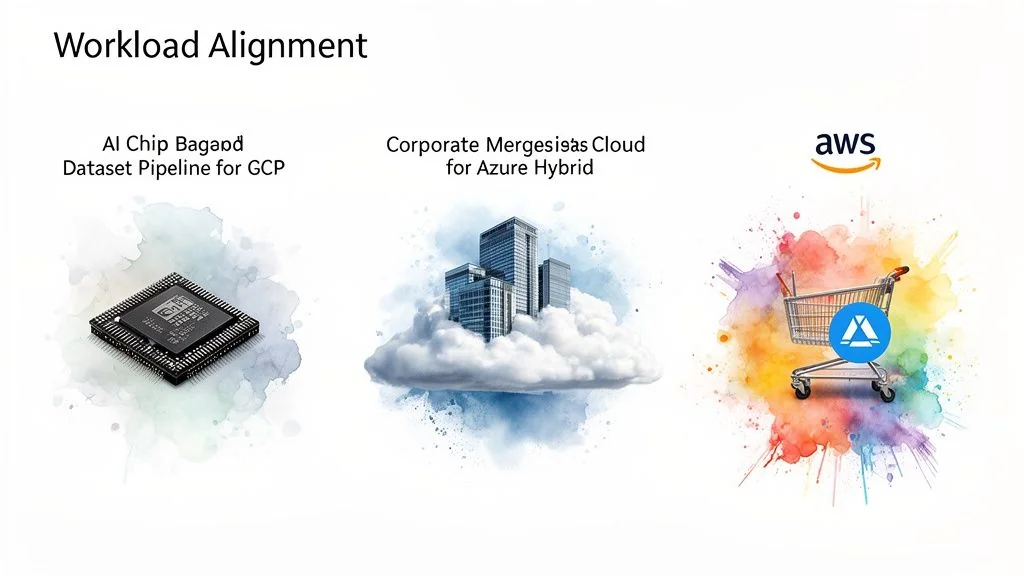
This alignment is critical. A provider’s engineering culture and strategic investments shape its services. Selecting a platform that natively supports your architecture leads to smoother development, lower operational overhead, and better performance for your investment.
For AI/ML and Big Data Analytics Workloads
For businesses centered on large-scale data processing or machine learning, Google Cloud Platform is a standout. Its leading tools, such as BigQuery and Vertex AI, were developed from Google’s own experience managing internet-scale data.
GCP’s edge in this area is based on several factors:
- BigQuery: A serverless, petabyte-scale data warehouse that can execute complex queries on massive datasets in seconds without server management.
- Vertex AI: A unified platform for the entire machine learning workflow, from data preparation and model training to deployment and monitoring, which simplifies MLOps.
- Specialized Hardware: GCP provides access to its proprietary Tensor Processing Units (TPUs), custom silicon designed to accelerate ML workloads, often delivering a better performance-per-dollar ratio than standard GPUs for specific tasks.
For companies where data is the product, GCP’s architecture offers a competitive advantage. The deep integration of its data, analytics, and AI services creates a powerful, unified ecosystem that accelerates the path from raw data to a deployed model.
While Amazon Web Services with SageMaker and Microsoft Azure with Azure Machine Learning offer powerful AI/ML platforms, they often feel like comprehensive toolkits assembled over time. GCP’s platform, in contrast, feels like a single, purpose-built machine for data innovation. To find a partner with deep expertise in this space, browse our Google Cloud data analytics partner directory.
For Enterprise Hybrid Cloud and Legacy Integration
For established enterprises with significant on-premises investments, particularly those on the Microsoft stack, Azure is often the path of least resistance. Microsoft has designed Azure as a natural extension of the corporate network, providing a seamless hybrid cloud solution.
Azure’s strength in the enterprise hybrid space is built on:
- Azure Arc: A key feature that allows management and governance of resources across on-premises, Azure, and even other clouds like AWS from a single control plane. This makes consistent security and operational policies achievable in a complex hybrid environment.
- Native Integration: Deep connections with tools like Windows Server, SQL Server, and Microsoft Entra ID (formerly Azure AD) allow IT teams to use existing skills and tools, reducing the learning curve.
- Azure Hybrid Benefit: This financial incentive allows companies to bring existing on-premises Windows Server and SQL Server licenses to the cloud, resulting in immediate cost savings that are difficult for competitors to match.
For organizations running on Windows Server and using Active Directory, moving to Azure is a logical next step rather than a radical change. You can explore top-rated implementation firms on our Azure partner hub.
For Scalable E-commerce and Mature Serverless Applications
For building highly resilient, scalable web applications, especially in e-commerce, or architecting sophisticated serverless systems, AWS remains the leader. Its long-standing market presence has resulted in an unparalleled range of services and operational maturity trusted by the world’s largest brands.
AWS’s leadership is based on:
- Breadth of Services: No other provider matches the sheer number of services AWS offers. This modular approach allows developers to build highly customized architectures using services like DynamoDB, Aurora, CloudFront, SQS, and SNS.
- Proven Reliability: AWS has the largest global footprint and a track record battle-tested by major technology companies. For global e-commerce, where downtime means lost revenue, this stability is essential.
- Mature Serverless Ecosystem: AWS Lambda, the pioneer of serverless computing, is supported by a vast ecosystem of event triggers and integrations, making it the go-to for event-driven, microservices-based applications that scale efficiently.
If AWS is the frontrunner for your workload, our AWS consulting partner rankings can help you find a certified firm with deep platform expertise.
While Google Cloud’s 10-13% market share is growing at 28-34% YoY, much of this is driven by the AI boom, as detailed in reports on fueling GCP’s impressive growth. This trend reinforces the concept of workload specialization. For general-purpose scale and reliability, AWS’s incumbency provides a strong default advantage.
Security, Compliance, and Governance: A Deeper Look
Security and compliance are the foundation of any enterprise cloud strategy, especially in regulated industries. When comparing AWS, Azure, and GCP, it is essential to look beyond marketing and examine each platform’s core security philosophy, governance tools, and audit-readiness.
While all three providers have invested heavily in securing their infrastructure, the key differences are in their native tools and compliance frameworks. The right choice depends on which platform’s approach aligns with your company’s risk tolerance and existing governance practices.
Compliance Certifications and Industry Strengths
All three providers hold a vast array of compliance certifications, including GDPR, ISO 27001, and SOC 1/2/3. However, each has specific areas of strength.
-
AWS has the most extensive list of certifications, a result of its long-standing market leadership. Its experience with government agencies makes it a leader in standards like FedRAMP, making it a common choice for public sector projects.
-
Azure is particularly strong in regulated industries like healthcare and finance. It emphasizes data residency and provides detailed documentation, building trust with companies navigating complex international regulations. For a deeper analysis, our guide on HIPAA-compliant cloud providers covers these requirements.
-
GCP leverages Google’s global private network to offer a “secure-by-default” model. While its certification list is robust, its main selling point is a security posture that is inherently strong, requiring less manual configuration.
Native Security and Governance Tools
Certifications are only the beginning. The built-in tools for managing security posture and enforcing governance are the real differentiators.
AWS provides a mature and granular toolkit, including AWS Security Hub for centralized alerts and AWS IAM (Identity and Access Management) for fine-grained permissions. This level of detail is a significant advantage for organizations with dedicated security teams.
The classic AWS trade-off is power versus complexity. Its tools offer unparalleled control but demand a high level of expertise. A simple misconfiguration can create a significant security gap.
Azure leverages its enterprise strengths with seamless integration. Microsoft Entra ID is the standard for enterprise identity management, and extending existing security policies to the cloud is straightforward for Microsoft shops. Azure Policy and Blueprints are effective for establishing automated guardrails to maintain compliance.
GCP offers a simpler, more integrated experience based on the same principles that protect Google’s services. Features like default encryption for data at rest and in transit reduce operational overhead for security teams. Google Cloud’s Security Command Center provides a unified dashboard for tracking assets and threats, consistent with its philosophy of simplifying robust security.
This table provides a side-by-side comparison of their core security services.
Security & Compliance Feature Comparison
| Security Area | AWS | Azure | GCP |
|---|---|---|---|
| Identity Management | AWS IAM: Extremely granular but can be complex. Best for teams wanting precise, resource-level control. | Microsoft Entra ID: The enterprise standard. Seamless integration for existing Microsoft customers. | Cloud Identity: Simple and integrated with Google Workspace. Easy to manage but less granular than AWS. |
| Security Hub/Dashboard | AWS Security Hub: Aggregates findings from GuardDuty, Macie, and other services into one central view. | Microsoft Defender for Cloud: Comprehensive posture management and threat protection, deeply integrated with the Azure ecosystem. | Security Command Center: Unified view of assets, vulnerabilities, and threats. Strong focus on automated detection. |
| Governance & Policy | AWS Config & Control Tower: Powerful for enforcing configuration rules and setting up multi-account governance. | Azure Policy & Blueprints: Excellent for creating and enforcing organizational standards and compliance templates. | Organization Policies & IAM Conditions: Provides straightforward, hierarchical control over resources across projects. |
| Key Compliance | FedRAMP High, DoD IL4/5, PCI DSS Level 1. The broadest set of government and industry certifications. | HIPAA/HITECH, HITRUST, GxP. Strong focus on healthcare, finance, and enterprise-specific compliance. | PCI DSS, ISO/IEC Series, SOC 1/2/3. Robust core certifications with a focus on data privacy and security. |
Ultimately, each platform provides top-tier security. The best choice depends on which philosophy and toolset align with your team’s expertise and your organization’s governance requirements.
An Actionable Framework for Choosing Your Cloud Provider
Selecting a cloud provider is a major strategic commitment. The final decision should not be based on a feature checklist but on your organization’s specific capabilities, culture, and market objectives. This approach turns the choice from a simple comparison into a calculated business decision.
Evaluate Your Internal Landscape
Begin by assessing your team’s existing skills and your company’s operational habits. A steep learning curve can derail a migration and increase costs, making your team’s current expertise a critical factor.
- Skill Set Alignment: If your team is proficient with Microsoft tools like Visual Studio and Entra ID, Azure will offer a smoother transition. If your team consists of open-source and Kubernetes experts, GCP will feel more natural. For teams with diverse cloud experience, the granular control of AWS is often an advantage.
- Risk and Governance Model: If you require precise control and have a dedicated security team, AWS provides the most extensive tools. If integrating enterprise identity and automating policy enforcement is a priority, Azure is designed for it. For companies that prefer a “secure-by-default” approach with less manual configuration, GCP is a strong choice.
A common mistake is choosing a platform based on future aspirations without an honest assessment of the team’s ability to manage it. The “best” platform on paper is ineffective if your team cannot manage its complexity and secure it properly.
Align with Your Go-to-Market Strategy
Your cloud platform should accelerate your product development and scaling, not become an operational bottleneck.
This decision tree simplifies the security aspect based on common business drivers.
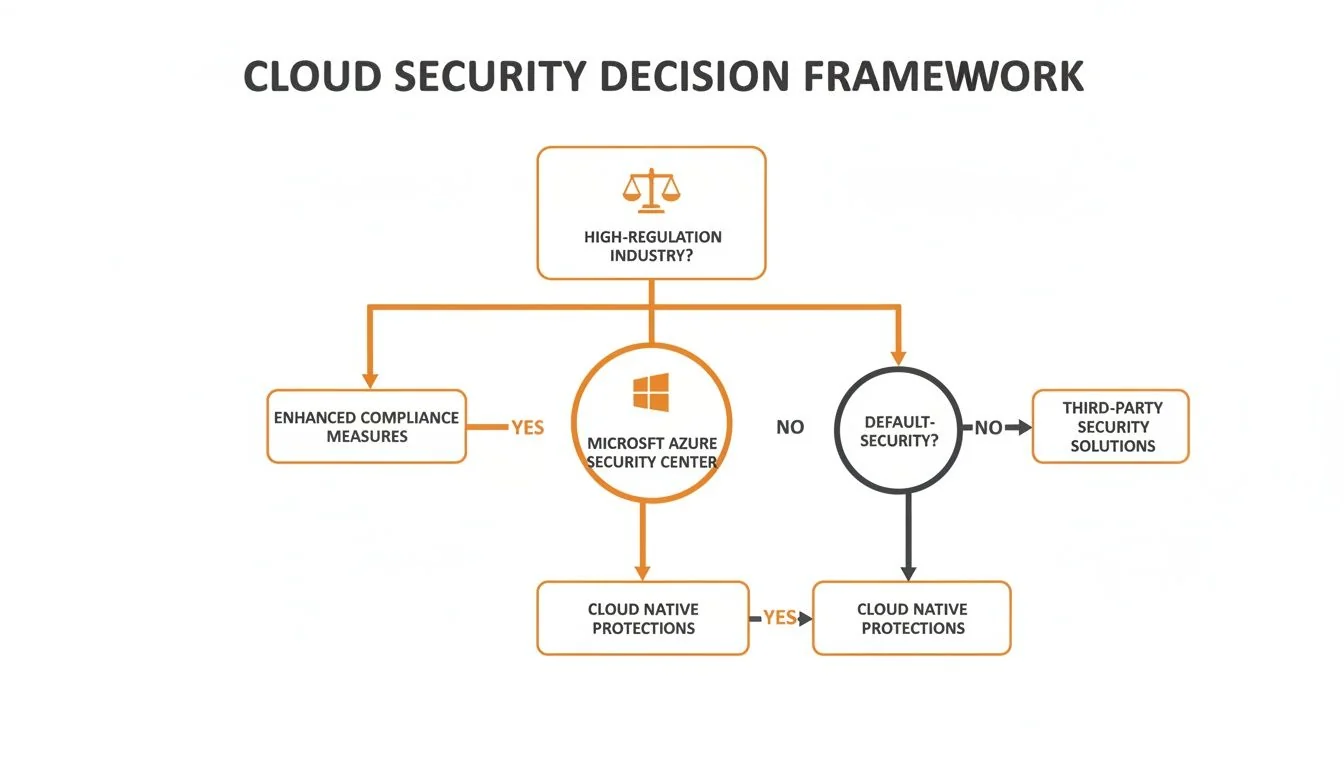
Factors such as stringent regulatory requirements or a deep dependency on Microsoft can steer you toward a specific provider.
Finally, consider your long-term vendor strategy. Are you committing to a single provider, or is a multi-cloud approach planned to avoid vendor lock-in? AWS has the largest ecosystem, Azure is the leader in hybrid cloud, and GCP’s open-source foundation often simplifies system integration. Answering these questions provides a solid, business-focused rationale for your final decision.
Finding the right implementation partner is just as critical as choosing the right platform. CloudConsultingFirms.com offers an independent, data-driven guide to help you select the perfect certified partner for your AWS, Azure, or Google Cloud project. Explore over 2,400 verified reviews and detailed firm profiles at CloudConsultingFirms.com.
Peter Korpak
Chief Analyst & Founder
Data-driven market researcher with 10+ years helping software agencies and IT organizations make evidence-based decisions. Former market research analyst at Aviva Investors and Credit Suisse. Analyzed 200+ verified cloud projects (migrations, implementations, optimizations) to build Cloud Intel.
Connect on LinkedInContinue Reading
Insights
Explore our complete insights hub
A Practical Cloud Governance Framework for AWS, Azure, and GCP
Build a future-proof cloud governance framework. Our technical guide covers cost, security, and compliance for AWS, Azure, and GCP to prevent waste and risk.
The 12 Best Multi Cloud Management Platforms for 2026 and Beyond
Discover the best multi cloud management platforms for 2026. Get an actionable, no-fluff comparison of features, pricing, and use cases.
Stay ahead of cloud consulting
Quarterly rankings, pricing benchmarks, and new research — delivered to your inbox.
No spam. Unsubscribe anytime.